
나의 분석일기 ♬
[웹 크롤링]동적 웹 크롤링 본문
[웹 크롤링]동적 웹 크롤링
로봇 배제 표준 문서
- 웹 사이트에 로봇이 접근하는 것을 방지하기 위한 규약
- 일반적으로 접근 제한에 대한 설명을 robots.txt 기술해 놓고 루트 디렉토리에 위치 시킨다.
- 이 규약은 권고안이며, 로봇이 robots.txt 파일을 읽고 접근을 중지하는 것을 목적으로 한다.
- 접근 방지 설정을 하였다고 해도, 다른 사람들이 그 파일에 접근할 수 있다
데이터 수집 시 주의 사항
- 로봇 배제 표준이 권고안이라도 불법으로 데이터를 수집하여 영업 혹은 저작권 침해에 해당된다면 법적 제재를 받을 수 있다.
- https://ko.wikipedia.org/wiki/%EB%A1%9C%EB%B4%87_%EB%B0%B0%EC%A0%9C_%ED%91%9C%EC%A4%80
1. SELENIUM(셀레니움)
- Selenium은 주로 웹앱을 테스트하는데 사용하는 프레임워크
- webdriver라는 API를 통해 운영체제에 설치된 크롬 등의 브라우저를 제어
- Selenium 모듈 설치 후 사용
- 사용자 브라우저(Chrome, Edge, ..)에 맞는 webdriver를 다운로드 후 사용 가능
- 다운로드 사이트에서 본인이 사용하는 브라우저의 버전등을 확인 후 다운로드 (버전이 업데이트되면서 사라졌다.)
- 크롬: https://chromedriver.chromium.org/downloads
- Edge: https://developer.microsoft.com/en-us/microsoft-edge/tools/webdriver/
- 파이어폭스:https://github.com/mozilla/geckodriver/releases
※ 주의 : 최근에 업데이트되면서 문법이 변경됨
- 웹드라이버
- selenium의 webdriver는 웹 응용 프로그램들의 테스트를 단순화 및 가속화해주는 툴
selenium version : 4.15.2
import selenium
import time
from selenium import webdriver
driver = webdriver.Chrome()
driver.get("https://www.naver.com")
time.sleep(10)
driver.close()
※ selenium 버전이 3에서 4로 변하면서 더이상 chrome driver 지원 X
- SELENIUM 내장 함수
1. get() : get() 함수는 입력한 url 주소로 접속하는 함수
driver.get("url 주소")
2. find_element(By., "") : 정적크롤링의 find과 같은 역할로, 크롤링을 위해 HTML 요소를 찾는 함수
from selenium.webdriver.common.by import By

find_element(By.ID, "id")
find_element(By.NAME, "name")
find_element(By.XPATH, "xpath")
find_element(By.LINK_TEXT, "link text")
find_element(By.PARTIAL_LINK_TEXT, "partial link text")
find_element(By.TAG_NAME, "tag name")
find_element(By.CLASS_NAME, "class name")
find_element(By.CSS_SELECTOR, "css selector")
예) find_element(By.CSS_SELECTOR, "css selector")
- copy 목록의 copy selector를 통해 속성을 찾을 수 있다.
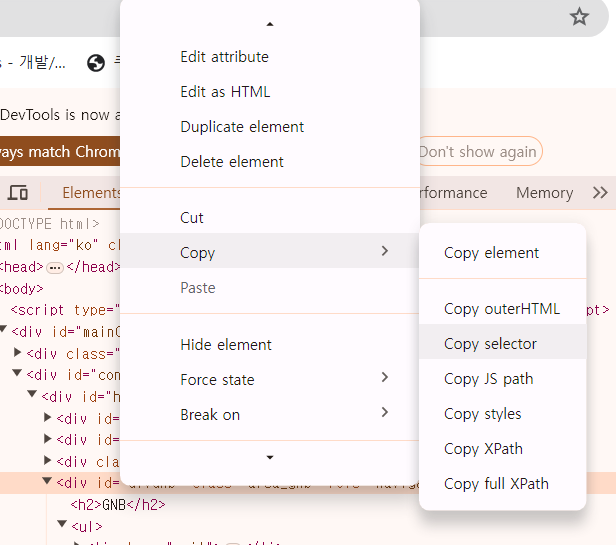
driver.find_element(By.CSS_SELECTOR, "a#writeFormBtn")
예) find_element(By.ID, "id") & find_element(By.CLASS_NAME, "class name")
- id 속성 혹은 class 속성을 가지고 있는 경우 사용한다
'글쓰기' 버튼 - <a href="#" id="writeFormBtn" class="btn_type1 post_write _rosRestrict" onclick="clickcr(this,'abt.wrtlist', '', '', event);">

driver.find_element(By.ID, "writeFormBtn")
driver.find_element(By.CLASS_NAME, "btn_type1.post_write._rosRestrict")
예) find_element(By.XPATH, "xpath")
- 적당한 id, class 속성이 없을 경우 xpath를 사용가능
- XPATH란 xml 문서의 특정 부분의 위치를 의미한다.
- html 요소를 우클릭하고 copy 목록의 copy xpath를 클릭해 사용가능

driver.find_element(By.XPATH, 'XPath 선택자')

# ex) '글쓰기' 버튼의 'Copy XPath'결과 - //*[@id="writeFormBtn"]
driver.find_element_by_xpath('//*[@id="writeFormBtn"]')
3. find_elements(By.??)
- 정적 크롤링의 find_all과 같은 역할로, 입력한 태그 및 선택자에 해당하는 모든 html 요소를 찾는 함수이다.
- element 뒤에 s가 붙는다.
- https://selenium-python.readthedocs.io/locating-elements.html#
4. click()
- html 요소를 클릭하는 함수이다
driver.find_element(By.???, "????").click()

ex) 글쓰기 버튼 클릭
driver.find_element(By.CSS_SELECTOR,"a#writeFormBtn").click()
5. send_keys()
- html 요소에 직접 텍스트를 입력하는 함수이다.
driver.find_element_by_??().send_keys("텍스트")

ex) 검색 칸에 파이썬 입력
driver.find_element_by_css_selector("input#query").send_keys("파이썬")
2. 브라우저를 통한 웹페이지 제어
from selenium.webdriver.common.by import By

driver = webdriver.Chrome()
driver.get("https://www.naver.com")
time.sleep(5)
driver.find_element(By.ID, "query").send_keys("문래역 맛집")
time.sleep(5)
driver.find_element(By.ID, "search-btn").click()
time.sleep(10)
html = driver.page_source
driver.close()
>> 네이버에 접속해 검색창에 문래역 맛집을 검색 후 html 소스 저장후 드라이버 종료
soup = bs(html, "html.parser")
for i in soup.find_all("span", {"class": "place_bluelink TYaxT"}):
    print(i.text)
한국의맛장수촌 영등포문래역점
솥돈 문래점
뽕씨네얼큰수제비 영등포본점
브라더매운갈비찜 문래본점
더루프로
동경화로 문래점
곱 문래본점
월화고기 문래점
'데이터 분석 > Crawling' 카테고리의 다른 글
| [웹 크롤링]OPEN API (0) | 2024.05.30 |
|---|---|
| [웹 크롤링]네이버 블로그 업로드 자동화(SELENIUM & ChatGPT) (0) | 2024.05.30 |
| [웹 크롤링]정적 웹 크롤링 (0) | 2024.05.29 |
| [웹 크롤링]웹 크롤링 기초 (0) | 2024.05.28 |
'데이터 분석/Crawling' Related Articles
more


Comments